Sales reconciliation without the weekend spreadsheet
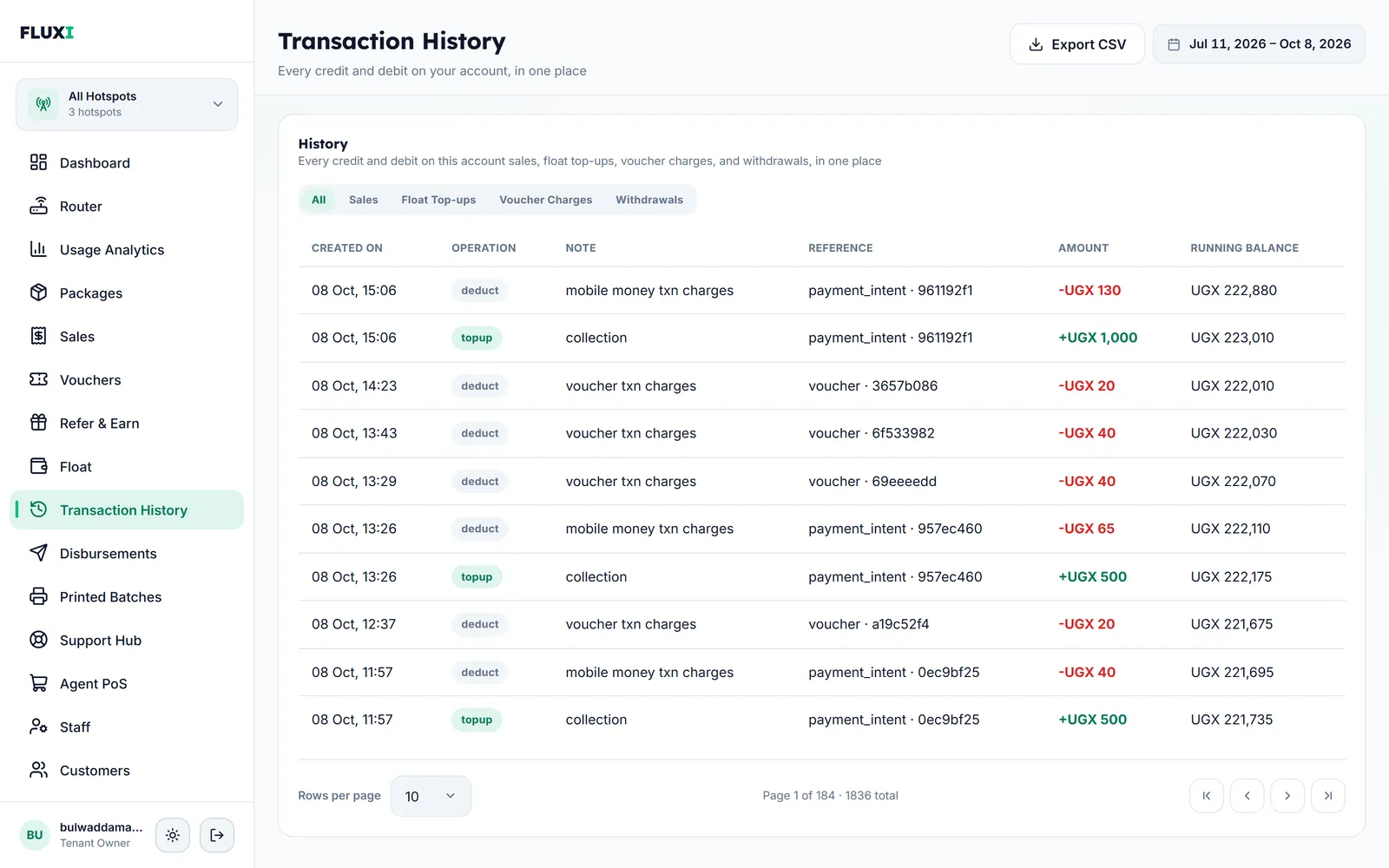
Printed voucher sales, mobile money payments, charges and withdrawals land in one ledger with a running balance, so the number in your wallet always has a reason.
What FLUXI does for you
One ledger, every shilling
Every credit and every charge is listed with its date, what it was, its reference, the amount and the balance after it. Filter by sales, top-ups, voucher charges or withdrawals.
Both channels in one list
The Sales page lists mobile money sales and printed voucher sales together. Filter by package, channel or the person who sold it.
Every batch accounted for
Each printed batch shows its hotspot, package, quantity, who generated it and when. The Vouchers page shows which cards are unused, active or expired.
Charges when cards are used
FLUXI's charge on a printed card is recorded when the card is first used, as its own line, so you can match it to the sale.
Roles that fit the job
Owners handle money, routers and the team. Assistants run the day. Staff sell and help customers without seeing what the business earns.
How it works with MikroTik
- A mobile money sale is credited the moment it is confirmed, with FLUXI's charge on its own line.
- A printed card's sale is recorded when a customer first logs in with it.
- Withdrawals show the fee before you confirm and appear in the ledger when sent.
- Export the ledger for any dates and hand it to your accountant.
What it does not do
We would rather say it plainly.
- It does not count the cash in your drawer. A printed card handed over for cash shows up when the customer first uses it.
- It does not record which staff member sold a printed card at the counter. Agent POS sales are recorded against the seller.
- It does not connect to accounting software. Exports are spreadsheet files.
Frequently asked questions
How do I match cash voucher sales with mobile money?
Open Sales and view both channels together, or filter to one. Each printed card appears when it is first used, next to the mobile money sales of the same day.
Where do I see FLUXI's charges?
In Transaction History. Every charge is its own line with the sale it belongs to and the running balance after it.
Can staff see my total earnings?
No. Staff see only their own sales. Money pages stay with the owner.
What happens if my balance goes negative?
A mobile money sale or a float top-up clears it. Below minus UGX 5,000, new printed activations and print batches pause until the balance is back to zero.
Can I export the ledger?
Yes. Transaction History exports every row that matches the tab and dates you choose to a CSV file.
Related guides
More FLUXI features
Run your hotspot on FLUXI
Sell by voucher or mobile money, keep every shilling accounted for, and see every router from one dashboard.
Get Started