WiFi voucher management, from print to first login
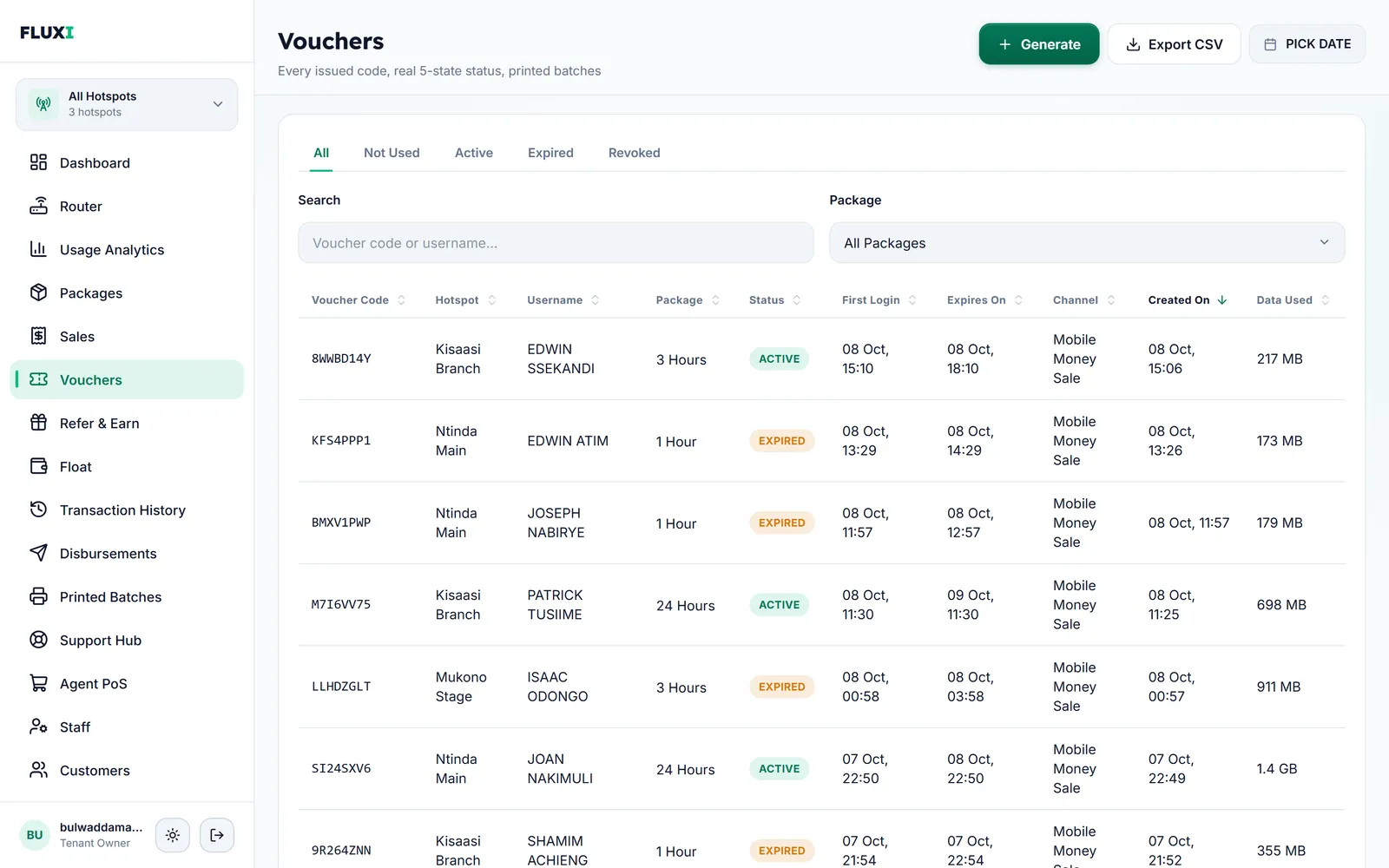
Print voucher cards for cash sales, sell codes by mobile money, and see every voucher in one list: not used, active, expired or revoked.
What FLUXI does for you
Print a batch in one step
Pick the hotspot, the package and how many cards you need, from 10 to 400. Choose one of six print designs and FLUXI hands you a PDF ready to print and cut. You can download any batch again later.
Codes that are hard to guess
Choose the code style for each batch: mixed case, letters and numbers, letters only or numbers only, up to 12 characters. FLUXI only offers styles with at least 10 billion possible codes, never prints look-alike characters such as 0 and O, and never reuses a code.
Time starts at first login
A printed card can wait in a drawer for weeks. Its time only starts when a customer first logs in with it, and FLUXI's charge on that card is taken then too, so unsold cards cost you nothing.
Every voucher in one list
Search by code or username, filter by package and date, and see each voucher's hotspot, status, first login, expiry and data used. Cards and mobile money codes sit side by side, and the list exports to a spreadsheet.
Packages decide the rules
Each package sets the price, the time, the upload and download speed, a data limit and how many devices can share one voucher at once. A free trial package of up to 30 minutes is available too.
How it works with MikroTik
- Create your packages: price, time, speed, data limit and devices per voucher.
- Generate a batch for a hotspot, pick a print design and print the PDF.
- Sell the cards for cash. A customer joins your Wi‑Fi and types the code on the login page.
- FLUXI checks the code, starts its time and the router lets the device online at the package's speed.
- When the time or the data runs out, the router ends access and the voucher shows as Expired.
What it does not do
We would rather say it plainly.
- It does not record which staff member sold a printed card at the counter. Sales made through the Agent POS are recorded against the person who made them.
- Code styles apply to printed cards only. Codes bought by mobile money are always 8 letters and numbers.
- It does not print or cut cards for you. FLUXI makes the PDF; printing is on your side.
Frequently asked questions
Do unsold printed vouchers expire?
No. A printed voucher's time only starts when a customer first logs in with it. Until then it is stock, however long it waits.
Can one voucher work on more than one device?
Only if the package allows it. Each package sets how many devices can use one voucher at the same time. The default is one.
What happens when a customer reaches the data limit?
Access ends, even if time is left on the voucher. Both the speed and the data limit are enforced by the router.
Can I download a batch again?
Yes. The Printed Batches page lists every batch with a Download button, using your chosen print design.
Are voucher codes case-sensitive?
Only in the mixed case style. Every other style can be typed in capitals or small letters.
Related guides
More FLUXI features
Run your hotspot on FLUXI
Sell by voucher or mobile money, keep every shilling accounted for, and see every router from one dashboard.
Get Started